
Pipeline
Owner, Stage, Next Task
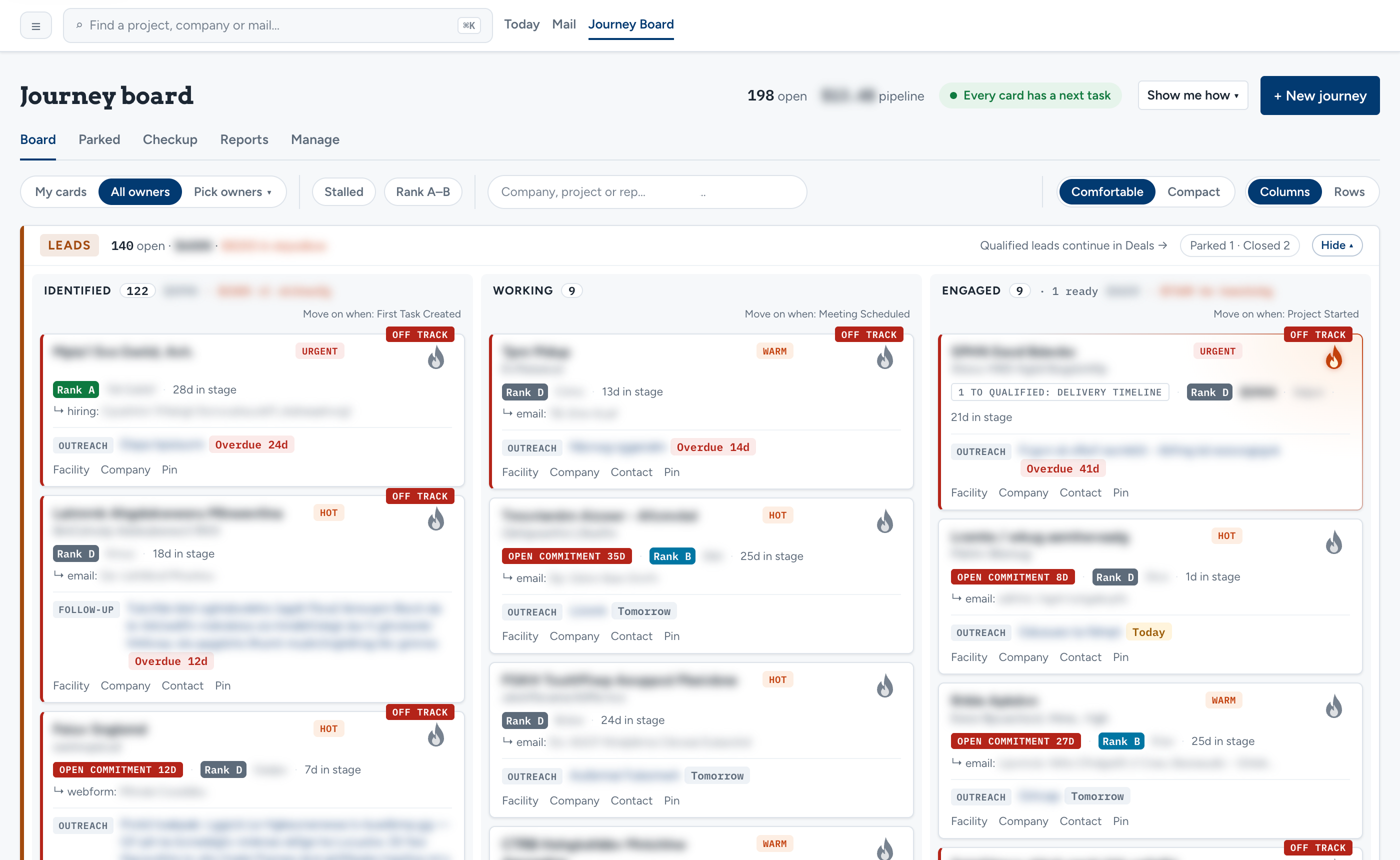
Every deal has an owner, a stage, and one open next task. Stages have written exit rules, a board view shows the whole pipeline, and deals that aren't ready can be parked for nurture.
A CRM built around how your team actually sells. Every deal has an owner, a stage, and a next task; mail and meetings are filed onto the deal they belong to; and AI reads, drafts, and proposes — while a person decides.
Most sales teams have one system of record on paper and another in practice. The real state of a deal lives in a rep's mailbox, the quote lives in a folder, the history lives in a spreadsheet somebody has kept for years, and the CRM gets updated after the fact — if at all. A generic CRM doesn't fix that. It was built for the average sales process, not yours.
I build the alternative: a custom CRM and sales platform shaped around how your team actually sells. It's for teams that have outgrown a generic CRM, or that run sales out of spreadsheets and inboxes. The pipeline uses your stages and your rules. Mail and meetings land on the deal they belong to. AI does the reading and the drafting; people make the calls.
The proof is Breadcrumb — a platform I built for a client's sales team that started as market intelligence and lead management and became the team's system of record for deals. What's described on this page comes from that build. See the Breadcrumb case study.
Six subsystems around one deal record — each one built to your process, not a vendor's.
Every deal has an owner, a stage, and one open next task. Stages have written exit rules, a board view shows the whole pipeline, and deals that aren't ready can be parked for nurture.
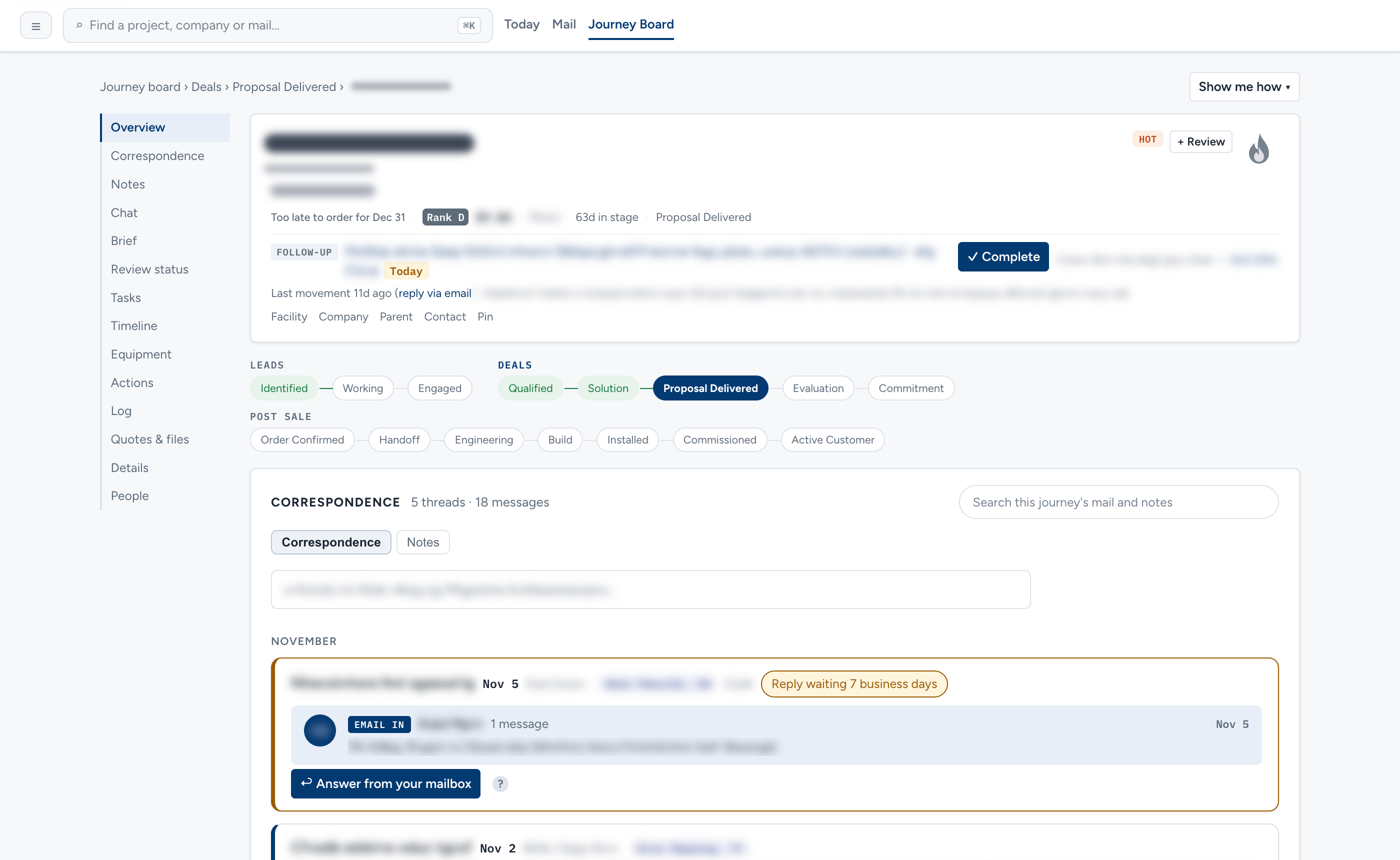
Your team's Microsoft 365 mailboxes are read through Microsoft Graph, with organization-level access granted by your company's admin. Threads are filed onto the right deal, and reps send from their own mailbox from inside the CRM.
After a Microsoft Teams meeting, the transcript is filed on the deal, facts are extracted, and a recap is drafted for the rep to confirm. In Breadcrumb, a follow-up task proposed from the call is still running in shadow mode.
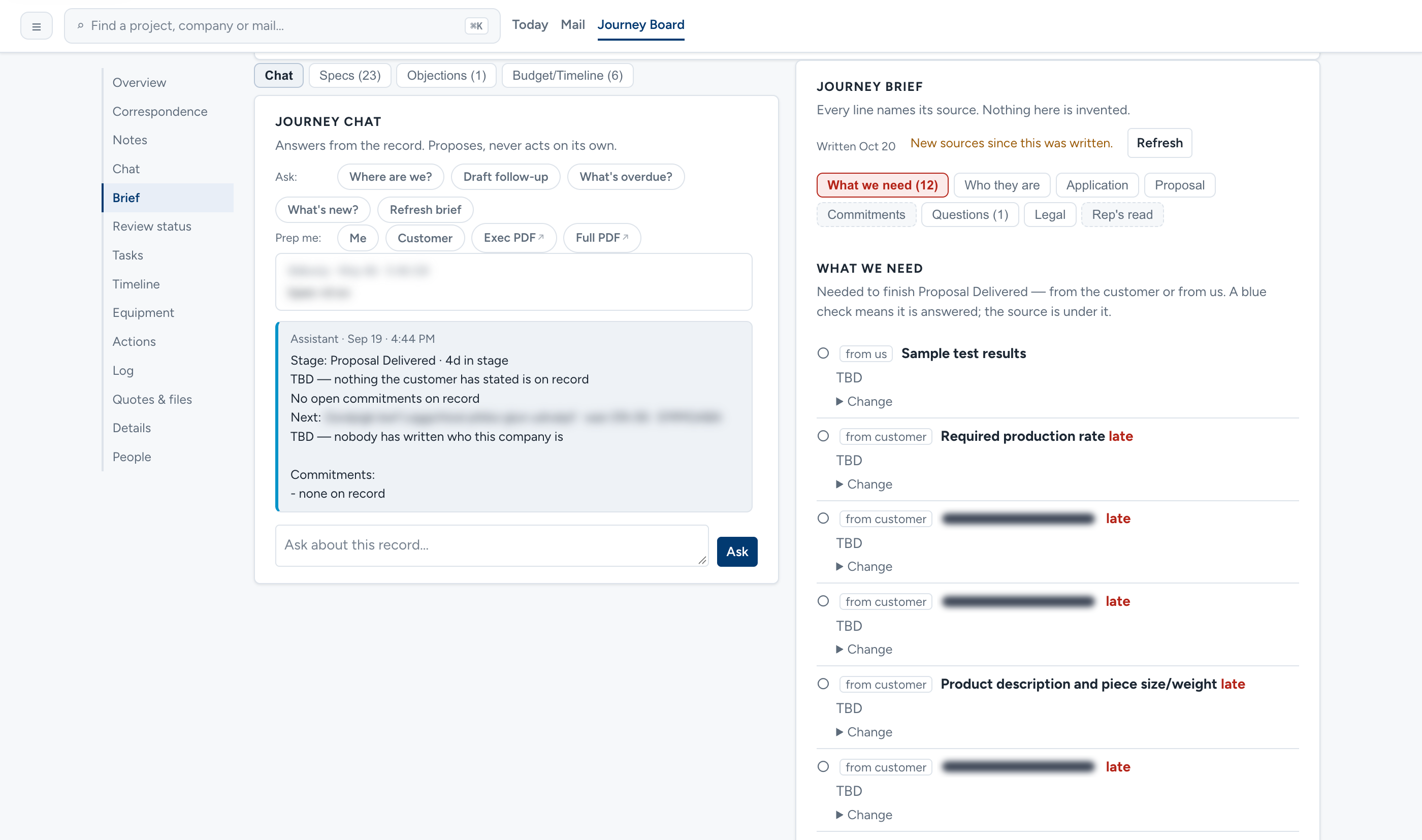
Each deal carries an AI brief built from a sourced fact store — mail, documents, and transcripts. Reps can correct or pin a fact when they know better.
Quote documents are generated from the deal's own data through your templates, with revisions kept. The template writes the quote, not a language model.
A weekly pipeline overview and reports for sales leadership, drawn from the same deal records the reps work in.
The CRM comes with a Claude connector (MCP), so reps can work it from Claude on web, desktop, or phone. In Breadcrumb the connector exposes 35+ tools, read and write, covering the routines a rep runs every day: a morning brief, call prep, call wrap-up, mail sorting, and account review.
A CRM holds the record your team is accountable for, so the AI in it is engineered to stay in its lane.
Breadcrumb is one platform with two halves. The first finds and ranks the market — every company, plant, and decision-maker, tiered against an ideal customer profile. That is Market Intelligence & Custom Lead Management. This page is the second half: what happens once a lead becomes a deal. The build is documented in the Breadcrumb case study.
Chosen per project, never per habit. Common building blocks include:
When the team has outgrown a generic CRM, or never really moved into one — deals live in spreadsheets, inboxes, and memory, and the CRM is something people update after the fact. A custom CRM is built around the stages, rules, quotes, and reports your team already uses, so working a deal and keeping the record are the same act. If an off-the-shelf CRM fits how you sell, I'll say so.
For Microsoft 365 and Teams, yes — that is what the Breadcrumb build runs on. The team's Microsoft 365 mailboxes are read through Microsoft Graph with organization-level access granted by the company's admin. Threads are filed onto the right deal, and reps send from their own mailbox from inside the CRM. For Microsoft Teams meetings, the transcript is filed on the deal, facts are extracted, and a recap is drafted for the rep to confirm; a follow-up task proposed from the call is still in shadow mode, not yet switched on.
Customer-facing mail is never auto-sent — a person approves every send. The rule across the system is that AI proposes and a person decides: tasks are proposed for a person to accept, recaps are drafted for the rep to confirm, and facts on a deal brief can be corrected or pinned. Most new AI behaviors first run in shadow mode — proposing, not acting — before they are switched on.
In Breadcrumb, the Claude connector exposes 35+ tools, read and write, so a rep can run a morning brief, prep for a call, wrap one up, sort mail, or review an account from Claude on web, desktop, or phone. Each person signs in as themselves, every tool call passes the CRM's own permission check for the page it stands in for, every write runs through the same code as the web UI, and changes are attributed to that person and logged. Email from Claude is draft-only — drafts wait for the rep to approve and send inside the CRM. Approval before each write is a setting your organization turns on in Claude.
It can come with you. In the Breadcrumb build, history from the team's previous CRM and a long-running spreadsheet register was imported and kept as searchable history, so the record of past work sits alongside the live pipeline.
Permissions are set per person and enforced fail-closed in one place, so anything not explicitly allowed is refused. Outside reps see only their own territory, and sales leadership gets a weekly pipeline overview and reports.
Tell me how your team sells today — the CRM, the spreadsheet, the inboxes — and where deals get lost. I'll map a system built around that process, and mark what AI should and should not touch.